
RagnaBet Mobile App Crashes on Launch: A Troubleshooting Guide
Experiencing the RagnaBet mobile app crashing as soon as you open it is a frustrating issue that prevents you from accessing your favorite games and potential winnings. This guide provides a practical, step-by-step walkthrough to diagnose and resolve the most common causes of this problem, getting you back to betting quickly.
Initial Quick Fixes and Basic Checks
Before diving into complex solutions, always start with the basics. First, ensure your device has a stable internet connection, as a poor signal can sometimes cause the app to fail during its initial handshake with the RagnaBet servers. Next, perform a simple force close and restart of the application. On Android, go to Settings > Apps > RagnaBet > Force Stop. On iOS, swipe up from the bottom (or double-click the home button) and swipe the app away. Then, try launching it again. If that fails, a full reboot of your smartphone can clear temporary memory glitches that often cause apps to crash on launch.
Verifying App and Device Compatibility
A primary reason for persistent crashes is a compatibility issue. The RagnaBet casino app requires a specific operating system version to function correctly. For iOS devices, you typically need iOS 13.0 or later. For Android, the requirement is usually Android 7.0 (Nougat) or higher. You can check your OS version in your phone’s Settings menu under ‘About Phone’. Furthermore, ensure you downloaded the official app from the correct source: the Apple App Store for iPhone users or the official RagnaBet website for Android users, as third-party APK files can be unstable or outdated.
| Problem | Solution | Time to Fix |
|---|---|---|
| Outdated App Version | Update via App Store or official site | 2-5 minutes |
| Insufficient Storage Space | Free up 500MB+ of space | Varies |
| Outdated OS | Update device operating system | 10-30 minutes |
| Corrupted App Data | Clear app cache and data | 1 minute |
Advanced Troubleshooting: Clearing Cache and Data
If basic steps don’t work, corrupted local data is a likely culprit. This process resets the app to a fresh state without uninstalling it. Important: Note your login details first, as this may log you out. On Android, navigate to Settings > Apps > RagnaBet > Storage. Tap ‘Clear Cache’ first and try launching. If it still crashes, go back and tap ‘Clear Data’ or ‘Clear Storage’. On iOS, offloading the app (Settings > General > iPhone Storage > RagnaBet > Offload App) achieves a similar result, preserving your documents and data while reinstalling the core app files.
Reinstalling the Application and Contacting Support
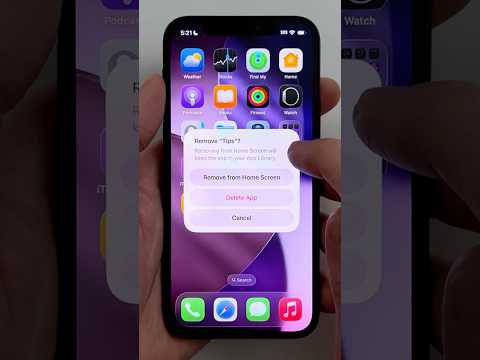
A complete uninstall and fresh reinstall is the most effective way to eliminate persistent software conflicts. Delete the RagnaBet app from your device. Restart your phone, then download and install the latest version from the official source. This ensures all application files are clean and current. If the app continues to crash after a reinstall, the problem is almost certainly on RagnaBet’s end. Contact their customer support directly. Be ready to provide your device model, operating system version, and a detailed description of the issue. This is also the best time to inquire if any ongoing RagnaBet bonus offers will be honored due to the technical downtime you experienced.
- Ensure you have a stable Wi-Fi or 5G connection.
- Force close the application and restart your device.
- Check for and install any available app or OS updates.
- Clear the app’s cache and data from your device settings.
- Perform a complete uninstall and then reinstall the app.
- Contact RagnaBet support with your device details if problems persist.
Claiming Missed Promotions After a Fix
After resolving the crash, you might have missed out on time-sensitive promotions like daily login bonuses or RagnaBet free spins. Fortunately, reputable operators often have policies to address this. Log in to your account through the now-functioning app or the desktop site. Check your bonus section and messages for any compensatory offers. If you missed a specific promotion, particularly one requiring a RagnaBet promo code, contact support, explain the situation politely, and they may manually credit the offer to your account. It’s also worth checking if a lucrative RagnaBet no deposit offer was available during the outage period. Remember, while the technical issue is resolved, ensuring you receive the full value from your ragnabet experience is the final step. For the latest official information, always refer to the website at RagnaBet.